
How to run UPDATE and DELETE safely on production
To run UPDATE or DELETE safely on production, write the WHERE clause first, run a SELECT with exactly the same WHERE to see which rows match, then run the change inside a transaction, check the affected row count, and only then COMMIT. Large changes go in limited batches. In Selekta, mark the connection as Production so destructive statements need you to type the connection name and SQL tabs start in manual commit.
The habits below work in any client and on any engine. The second half shows how Selekta enforces them for you.
The routine, step by step
- Write the WHERE before the verb. Start from the condition, not from
DELETE FROM. A half-typedDELETE FROM ordersthat runs by accident removes everything; a half-typedWHERE status = 'test'does nothing. - SELECT the same predicate. Copy the WHERE into a SELECT and look at the rows and their count.
- Open a transaction. Run the change between
BEGINandCOMMITso you can still roll it back. - Run the change and compare the row count the server reports with the count from step 2. If they differ, roll back.
- Check the result with a SELECT inside the same transaction.
- COMMIT, or ROLLBACK if anything looks wrong.
- Batch large changes. Change tens of thousands of rows at a time, not millions, so locks stay short and replicas keep up.
Here is the routine in SQL:
-- 2. what will change?
SELECT id, status, created_at
FROM orders
WHERE status = 'pending' AND created_at < '2026-01-01';
-- 1,284 rows

-- 3. to 6.
BEGIN;
UPDATE orders
SET status = 'expired'
WHERE status = 'pending' AND created_at < '2026-01-01';
-- UPDATE 1284   (matches the SELECT, so continue)
SELECT count(*) FROM orders WHERE status = 'expired' AND created_at < '2026-01-01';
COMMIT;            -- or ROLLBACK;
On SQL Server use BEGIN TRANSACTION and COMMIT TRANSACTION; on MySQL START TRANSACTION or BEGIN. MySQL DDL such as ALTER TABLE commits implicitly, so keep schema changes out of these transactions.
Two more habits help: use RETURNING (PostgreSQL, SQLite 3.35+) or OUTPUT (SQL Server) to see the changed rows, and keep a copy of what you delete:
CREATE TABLE orders_deleted_20261023 AS
SELECT * FROM orders WHERE status = 'test';
DELETE FROM orders WHERE status = 'test' RETURNING id;
Limiting batches on each engine
Large changes are safer in batches. The syntax differs by engine.
MySQL and MariaDB allow LIMIT on single-table UPDATE and DELETE. Add ORDER BY on the key so each batch is predictable, and repeat until 0 rows are affected:
DELETE FROM events WHERE created_at < '2025-01-01' ORDER BY id LIMIT 10000;PostgreSQL has no LIMIT on UPDATE or DELETE. Select the keys in a subquery:
DELETE FROM events
WHERE id IN (
  SELECT id FROM events WHERE created_at < '2025-01-01' ORDER BY id LIMIT 10000
);
SQL Server uses TOP. Rows are not taken in a guaranteed order, which is fine for purges:
DELETE TOP (10000) FROM dbo.Events WHERE CreatedAt < '2025-01-01';SQLite supports LIMIT on DELETE only when built with a special option, so use the PostgreSQL pattern with rowid or the primary key.
Commit after each batch rather than holding one long transaction.
Mark the connection as Production
In the connection dialog, set Environment to Production. The help text sums it up: "Production shows a red ENV cell and asks you to type the connection name before destructive statements run." Staging shows an outlined STAGING cell and asks with a simple confirm. Local and None add no extra prompts beyond the basic ones below.
You can also tick Read-only on connections you only read from. A read-only connection refuses writes outright ("Nothing ran") while SELECT, EXPLAIN and SHOW still work.
What Selekta checks before a statement runs
Selekta parses each statement before sending it. Nothing is sent until you confirm. On every connection, including Local, it asks before:
DELETEorUPDATEwithout a WHERE clause (also inside aWITHstatement),TRUNCATE,DROP.
On Production and Staging it also asks before ALTER … DROP, DO blocks, CALL, EXEC and T-SQL blocks, MERGE that updates or deletes, data-modifying WITH, and any filtered UPDATE or DELETE that the planner estimates will touch more than 1,000 rows.
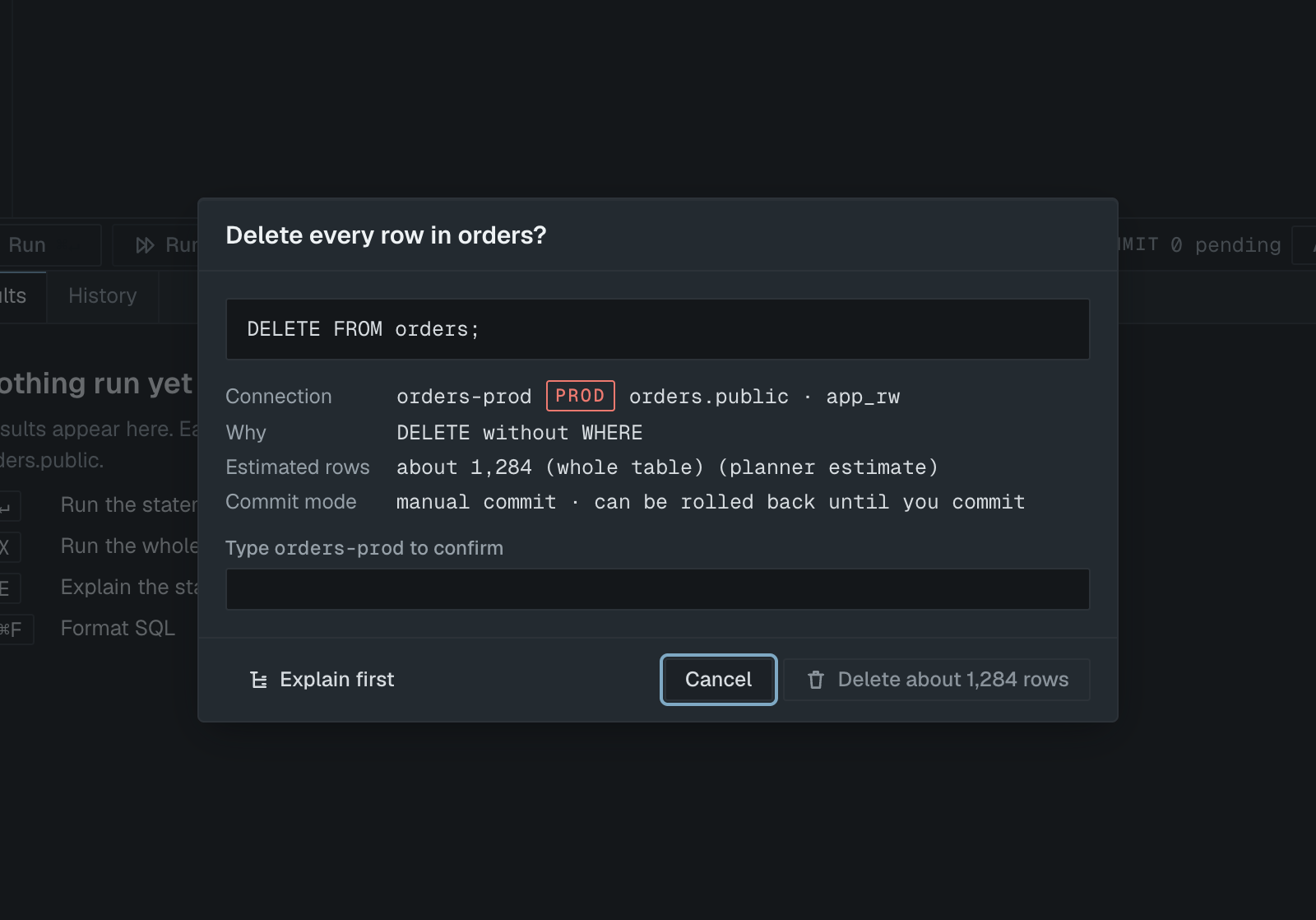
The confirmation dialog shows the statement, the connection and user, the reason ("UPDATE without WHERE", "DELETE matching about 1284 rows"), the planner's row estimate and the commit mode. On Production you must type the connection name into Type orders-prod to confirm before the button, for example Delete about 1,284 rows, becomes active. Focus starts on Cancel, Esc cancels, and ↵ never confirms. Explain first shows the plan before you decide.
Manual commit on Production tabs
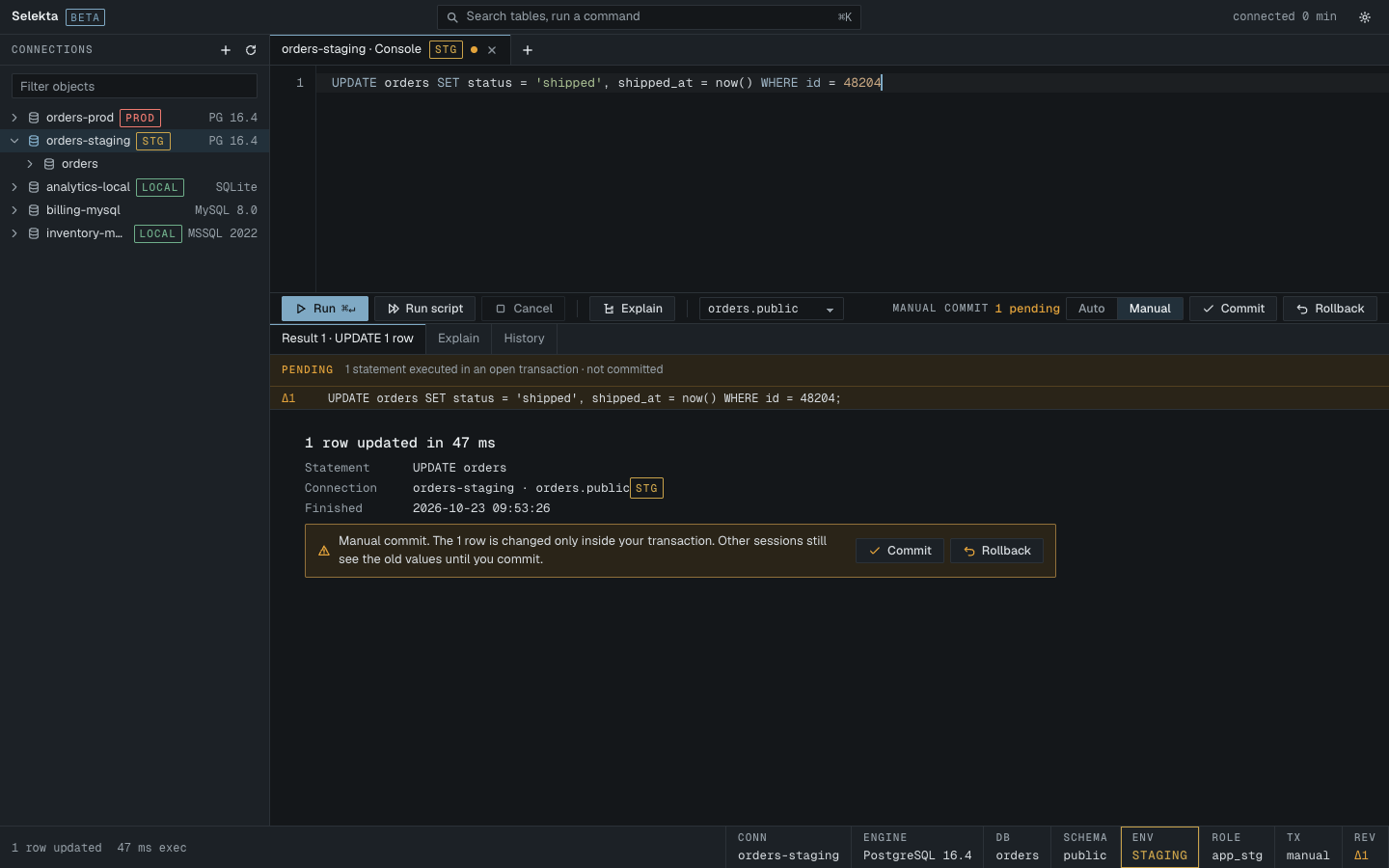
New SQL tabs on a Production connection open in Manual commit (Settings › Editor › Start Production tabs in manual commit, on by default). Every statement you run joins an open transaction. The action bar shows Manual commit with a count such as "2 pending", and the pending statements are listed under the editor as "executed in an open transaction · not committed".
- Press ⌥⌘↵ to Commit, or ⌥⌘⌫ to Rollback.
- Closing the tab, or switching it to Auto, while statements are pending asks "Close with 2 uncommitted statements?" and offers Roll back and close or Commit and close. There is no way to close without deciding.
- If the connection drops, the server rolls the transaction back. Selekta says so and restores your statements as pending revisions, with Run again and Copy as SQL.
- Rolled-back statements stay in History marked VOID, so you can see what was tried.
Editing rows in the grid: revisions and Review SQL
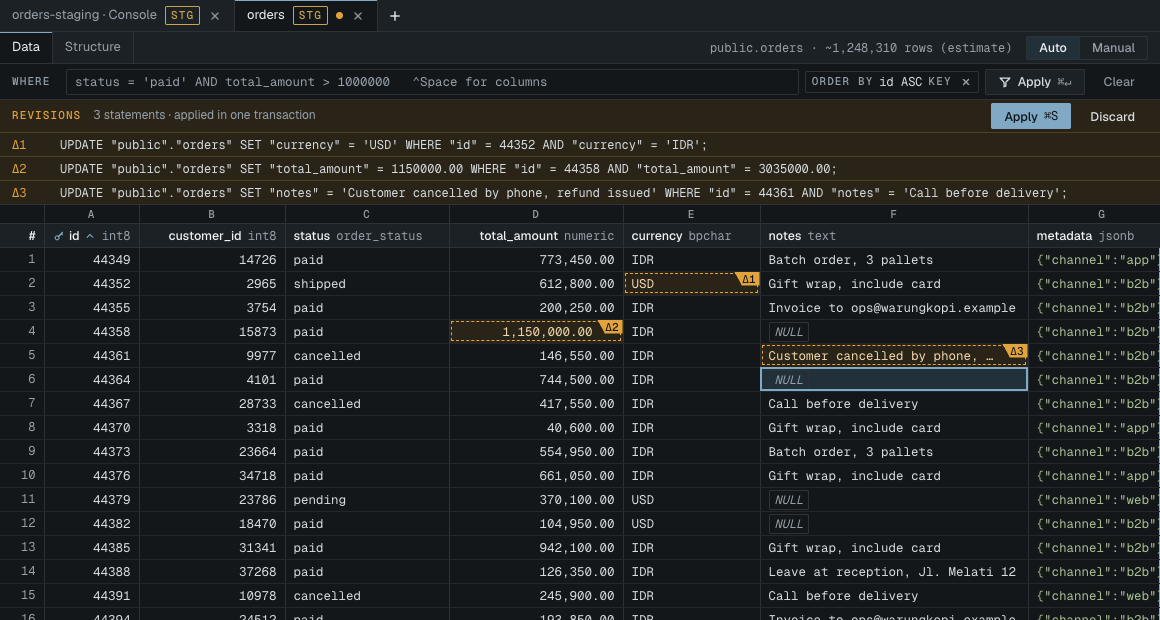
Changing a few rows by hand is often safer in the data grid than in SQL, because the WHERE clause is generated from the primary key. Open the table, edit cells, add rows with ⌥⌘N or delete them with ⌫. Nothing is sent yet: each change is a numbered revision, highlighted in amber.
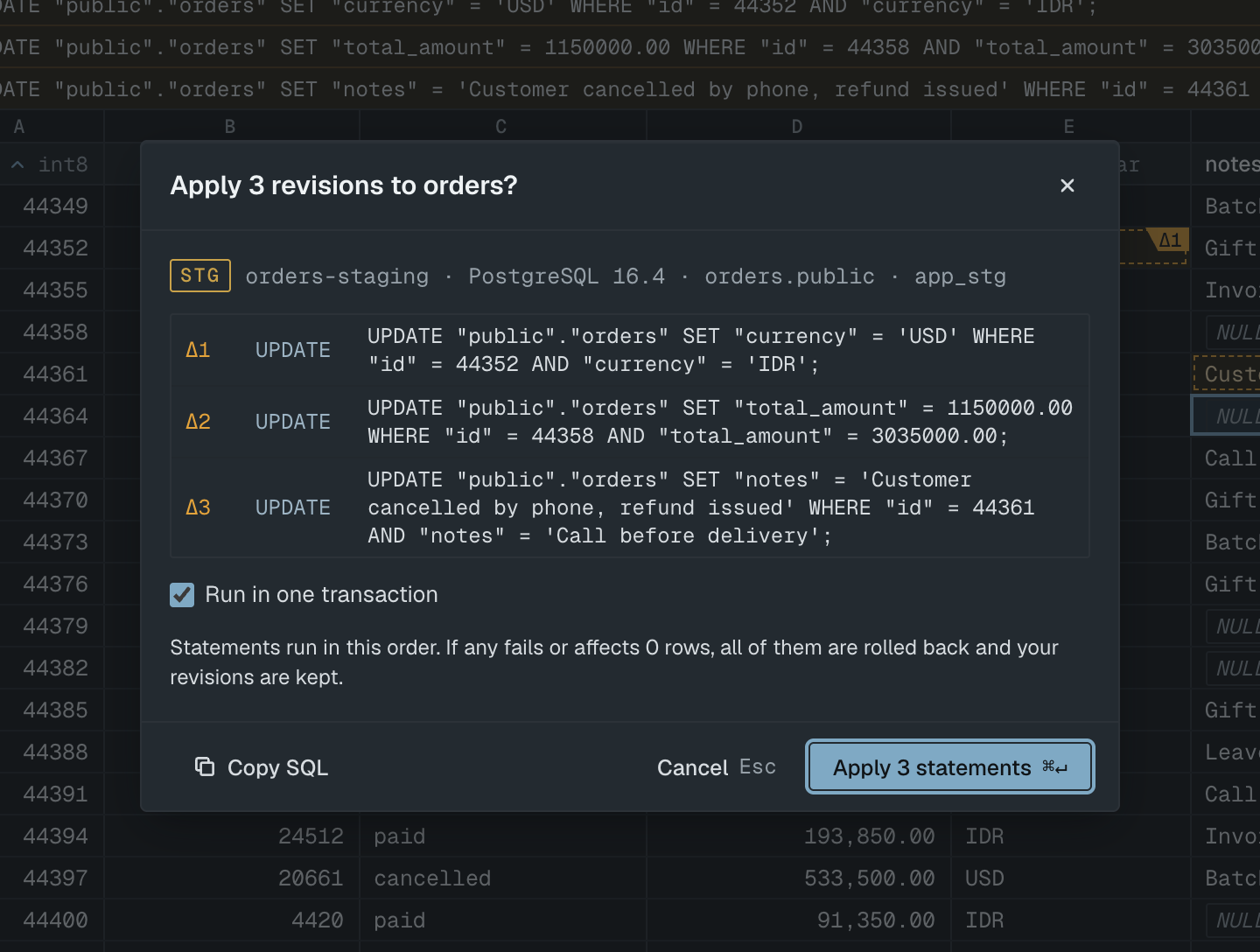
Press Apply (⌘S) and Review SQL opens, in every environment. It lists each UPDATE, INSERT and DELETE in execution order with the target connection. With Run in one transaction ticked (the default), "if any fails or affects 0 rows, all of them are rolled back and your revisions are kept". That catches a row someone else changed or deleted in the meantime. Copy SQL puts the statements on the clipboard for a change ticket.
If it fails
UPDATE without WHERE or DELETE without WHERE in the confirmation dialog: the statement has no filter and would change every row. Click Cancel and add the WHERE clause, unless that really is what you want.
DELETE matching about 48210 rows: the planner expects far more rows than you probably meant. Cancel, run the SELECT, and batch the change.
These revisions cannot be applied: shown in Review SQL when the revisions cannot be turned into SQL. The reason follows the colon. Fix the edited value, or click Discard in the Revisions strip and start again.
Reconnected to orders-prod. The server rolled back the open transaction. Nothing was committed. Your statements are restored as pending revisions; run them again or copy them.
Nothing ran with "Use a read-write connection for this change, or turn off read-only on orders-prod.": the connection is read-only. That is by design.