
Production safety
Mark a connection as Production and Selekta labels it on every screen, asks you to type its name before a destructive statement runs, and opens new SQL and data tabs in manual commit. A read-only connection goes further: writes are refused before they are sent.
Environment tags
Every connection has an Environment field in the connection dialog. It decides how the connection is labelled and how careful Selekta is with it:
| Environment | Label | Destructive statements |
|---|---|---|
| Production | Red filled PRODUCTION cell, Prod tag |
Type the connection name to confirm |
| Staging | Outlined STAGING cell, Stg tag |
Confirm, with extra checks |
| Local | LOCAL cell, Local tag |
Confirm only the always-guarded statements |
| None | No cell | Confirm only the always-guarded statements |
The tag appears next to the connection in the navigator, in history, and in every confirm and review dialog. Red fill is used only for Production.
The title block
The status bar of every editor tab is a title block: a row of labelled cells that tells you where the tab is and what state it is in.
- Conn: the connection name. Hover it for the session time zone.
- Engine, DB, Schema: the server version, database and current schema.
- Env: the environment word, filled red for Production.
- Mode:
READ-ONLYwith a lock, only on read-only connections. - Role: the user the connection signs in as.
- TX:
auto,manual,aborted,rolled back, ornonewhen disconnected. - Rev: the number of pending revisions, shown as
Δ3in amber when there are any.
In a narrow window the Engine, Role and DB cells are dropped; hover Conn to read them. The Env cell is never dropped.
The typed confirm guard
Before a statement is sent, Selekta checks it. When it needs confirmation, nothing runs, and a dialog shows the full statement, the connection, why it was stopped, the estimated rows (from the planner, when the engine gives one) and the commit mode, including whether it can still be rolled back.
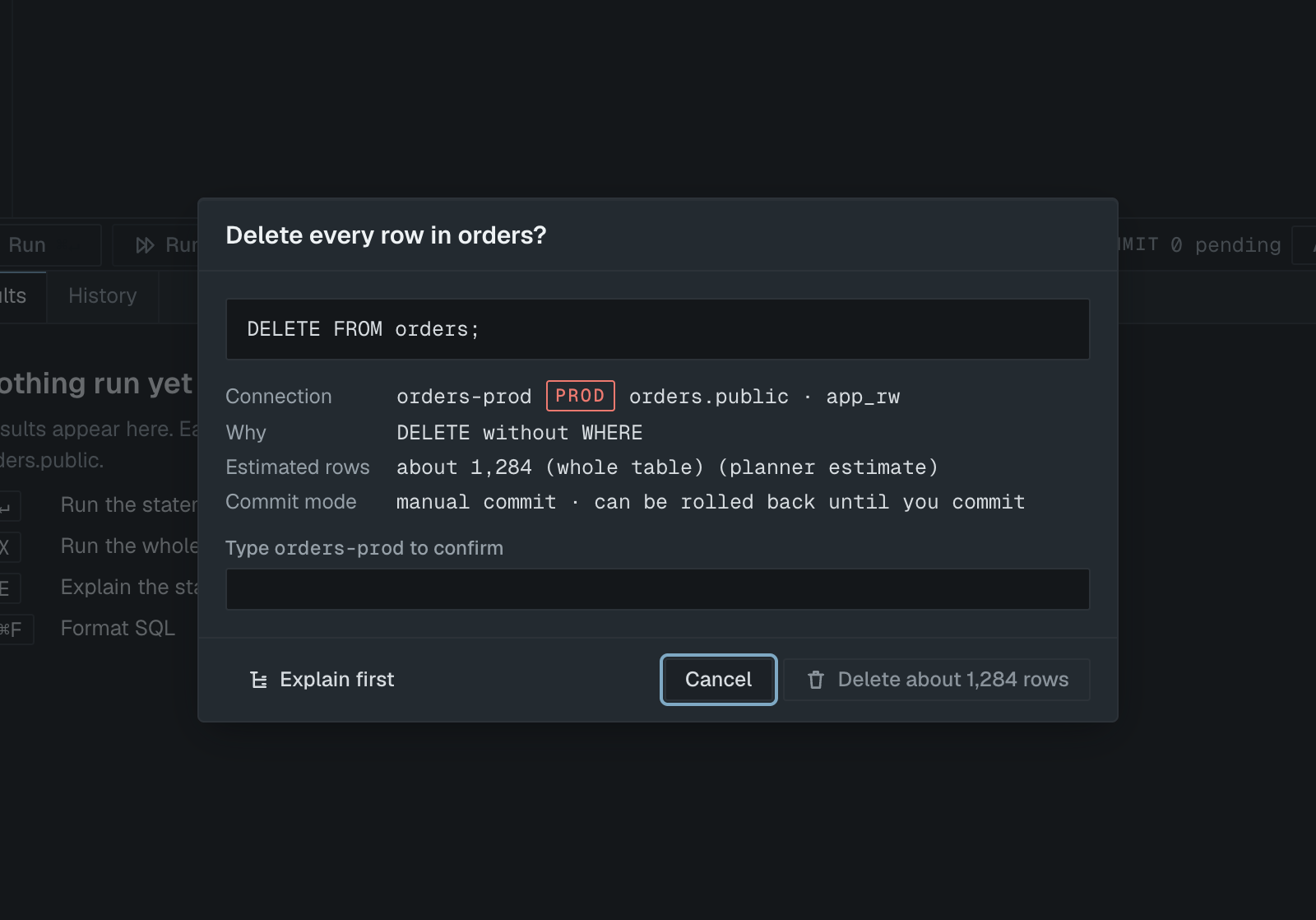
On Production the confirm button stays disabled until you type the connection name exactly. On every other environment you confirm with the button. Focus starts on Cancel, Esc cancels, and Return never confirms. Explain first shows the plan of the statement without running it.
Which statements trigger it
On every connection, whatever its environment:
DELETEorUPDATEwithout aWHEREclause, including one inside aWITHclauseTRUNCATEDROPof any object
On Production and Staging, also:
ALTER ... DROP, for example dropping a column or constraint- A
DELETEorUPDATEwith aWHEREclause that the planner estimates will touch more than 1,000 rows - Statements whose effect the planner cannot estimate: a PostgreSQL
DOblock,CALL, SQL ServerEXECandBEGIN ... END,IForWHILEblocks MERGEwith aDELETEorUPDATEbranch- A
WITHclause that contains its ownINSERT,UPDATEorDELETE
SQLite gives no row estimate, so the 1,000 row rule never applies there. A plain EXPLAIN is not checked because it does not run the statement; EXPLAIN ANALYZE is checked, because it does.
In a script
When you run a script, Selekta checks every statement first. Nothing runs before the first guarded statement is confirmed. After you confirm, the script runs from that statement on and stops again before the next guarded one. On SQL Server a GO batch is checked and confirmed as a whole.
The guard runs on the statement after parameters are filled in, so the dialog shows what will actually be sent.
Other confirms on Production
- Applying structure changes that drop or rebuild something asks for the connection name. See Structure editor.
- Deleting a Production connection asks you to type its name. Turning off read-only on a Production connection asks for confirmation.
- Edits on a table's Data tab always go through Review SQL, in every environment. Each change targets one row by key.
Manual commit on Production
Settings › Editor › Start Production tabs in manual commit is on by default. New SQL tabs and table Data tabs on a Production connection then open in manual commit, so every change waits in an open transaction until you press Commit (⌥⌘↵), and Rollback (⌥⌘⌫) undoes it. The tab never shows Auto while its session is still opening.
You can switch a tab to Auto in its action bar. If statements are pending, Selekta asks you to commit or roll them back first. Each tab has its own Auto and Manual switch, so switching one tab leaves the others as they are. See Manual commit for what happens on close, disconnect and failed commits.
Read-only connections
Tick Read-only in the connection dialog, or use Set read-only in the connection's context menu in the navigator. The title block shows READ-ONLY, and the SQL editor's action bar shows Read-only.
On a read-only connection only reading statements run: SELECT, VALUES, TABLE, SHOW, EXPLAIN, DESCRIBE, WITH without writes, SET, USE, PRAGMA and transaction control. Everything else is blocked before it reaches the server, including INSERT, UPDATE, DELETE, MERGE, DDL, SELECT ... INTO, EXPLAIN ANALYZE of a write, and statements that would turn the read-only setting off. A blocked script runs none of its statements. The banner reads "Not sent", and the statement is kept in History as VOID with the note blocked.
Selekta also asks the server to enforce it where the engine allows:
- PostgreSQL: the session opens read-only (
default_transaction_read_only, thenSET SESSION CHARACTERISTICS AS TRANSACTION READ ONLY). Behind a connection pooler only Selekta's own check applies. - MySQL:
SET SESSION TRANSACTION READ ONLY. - SQLite: the file is opened read-only and
PRAGMA query_onlyis set. - SQL Server: the login uses
ApplicationIntent=ReadOnly, which is only a hint, so Selekta's check is what blocks writes.
The Data tab shows rows without editing, Edit structure and New table… are disabled, and import and restore are blocked. To turn it off, use Turn off read-only in the navigator; on Production this asks for confirmation.