
Maps for geometry columns
When a result has a geometry column, click Map above the results to draw the fetched rows on a map beside the grid. Selekta reads PostGIS geometry and geography values and MySQL or MariaDB spatial columns, reprojects common coordinate systems to longitude and latitude, and draws them over an OpenStreetMap basemap.
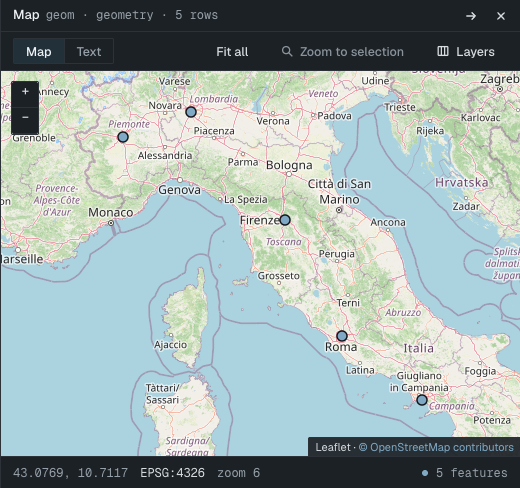
Which columns can be drawn
| Database | Column types | SRID |
|---|---|---|
| PostgreSQL with PostGIS | geometry, geography |
Read from the value. geography without an SRID is treated as EPSG:4326. |
| MySQL and MariaDB | Every spatial type (GEOMETRY, POINT, LINESTRING, POLYGON and the multi and collection types) |
Read from the value. SRID 0 means undefined. |
Points, lines, polygons, their multi forms and geometry collections are all drawn. Z and M values are kept in the WKT text but dropped for drawing.
SQL Server geometry and geography values and SQLite blobs are not decoded, so they cannot be drawn. A column of those types shows as raw bytes in the grid.
Open the map
- Run a query that returns a geometry column, or open a table that has one.
- Click Map in the toolbar above the results. The button is disabled when the result has no geometry column.
The map opens beside the grid. Selection is shared with the grid:
- Click a shape to select its row. Hold Command while clicking to add rows to the selection.
- Select rows in the grid and they are highlighted on the map. The map does not move on its own.
- Fit all zooms to every shape. Zoom to selection zooms to the selected rows.
- Hover a shape to see its row number and the first text column of that row.
Use the fullscreen button in the panel header to give the map the whole work area. Exit fullscreen brings the grid back.
If a result has more than one geometry column, open Layers and pick the one to draw under Geometry column.
Coordinate systems and reprojection
Map tiles use Web Mercator, so Selekta converts every shape to longitude and latitude (EPSG:4326) before drawing it. The footer shows the coordinate system, for example EPSG:4326 · from EPSG:27700 via proj4.
These SRIDs are converted with built-in proj4 definitions:
| SRID | Coordinate system |
|---|---|
| 4326 | WGS 84 longitude and latitude, drawn as is |
| 3857, 900913 | Web Mercator |
| 3395 | World Mercator |
| 4258, 4269 | ETRS89, NAD83 |
| 27700 | British National Grid |
| 2154 | RGF93 Lambert 93 (France) |
| 3035 | ETRS89 LAEA Europe |
| 2193 | New Zealand Transverse Mercator |
| 32601 to 32660, 32701 to 32760 | WGS 84 UTM zones, north and south |
| 25828 to 25838 | ETRS89 UTM zones |
Planar SRIDs
When a value has SRID 0, or an SRID that is not in the list above, Selekta cannot place it on the world map. It draws the shapes on a plain grid in their own units, with no basemap, and a banner explains why.
To put them on the map, convert them in your query:
-- the values are longitude and latitude but have no SRID
SELECT id, ST_SetSRID(geom, 4326) AS geom FROM sites;

-- the values use another coordinate system
SELECT id, ST_Transform(geom, 4326) AS geom FROM parcels;
Copy WKT or GeoJSON
Switch the panel from Map to Text to see the geometries as text. Choose WKT or GeoJSON, then Copy.
- WKT lists one block per row, with a comment line giving the row number, the first text column and the SRID, followed by the full-precision WKT.
- GeoJSON is a FeatureCollection in EPSG:4326. The other columns become properties, and the feature id is the key column value or the row number.
Text mode covers the selected rows, or the first 5,000 rows when nothing is selected.
In the record panel, a geometry field shows its WKT, a small map of the shape, and the buttons Show on Map, Copy WKT and Copy GeoJSON.
Basemap and tile server
The basemap is OpenStreetMap by default. Change it in Settings › Map:
| Setting | What it does |
|---|---|
| Show basemap | Off draws the shapes on a plain grid and makes no tile requests. |
| Tile URL template | XYZ raster tiles over https. The template needs {z}, {x} and {y}, and may use {s} for subdomains. |
| Attribution | Shown on every map, bottom right. It is required for any tile server other than the default. |
| Max zoom | The tile server's highest zoom level, 1 to 22. OpenStreetMap serves up to 19. |
tile.openstreetmap.org is a donated community service with a usage policy: light interactive use, attribution visible, no bulk downloading. For heavy or team-wide use, set a commercial or self-hosted tile server.
In the map, Layers lets you turn the basemap off for the current panel. Shapes are always drawn, with or without tiles.