
SQLite
A SQLite connection in Selekta points at a database file on your Mac. You open an existing file with Open SQLite file, or create an empty one with Create if missing; there is no server, port, user or password.
Open a file
- On the welcome screen, click Open SQLite file.
- Pick a
.db,.sqliteor.sqlite3file in the file picker. - The new connection dialog opens with Database file filled in. Adjust Name and Environment if you like.
- Click Test, then Save.
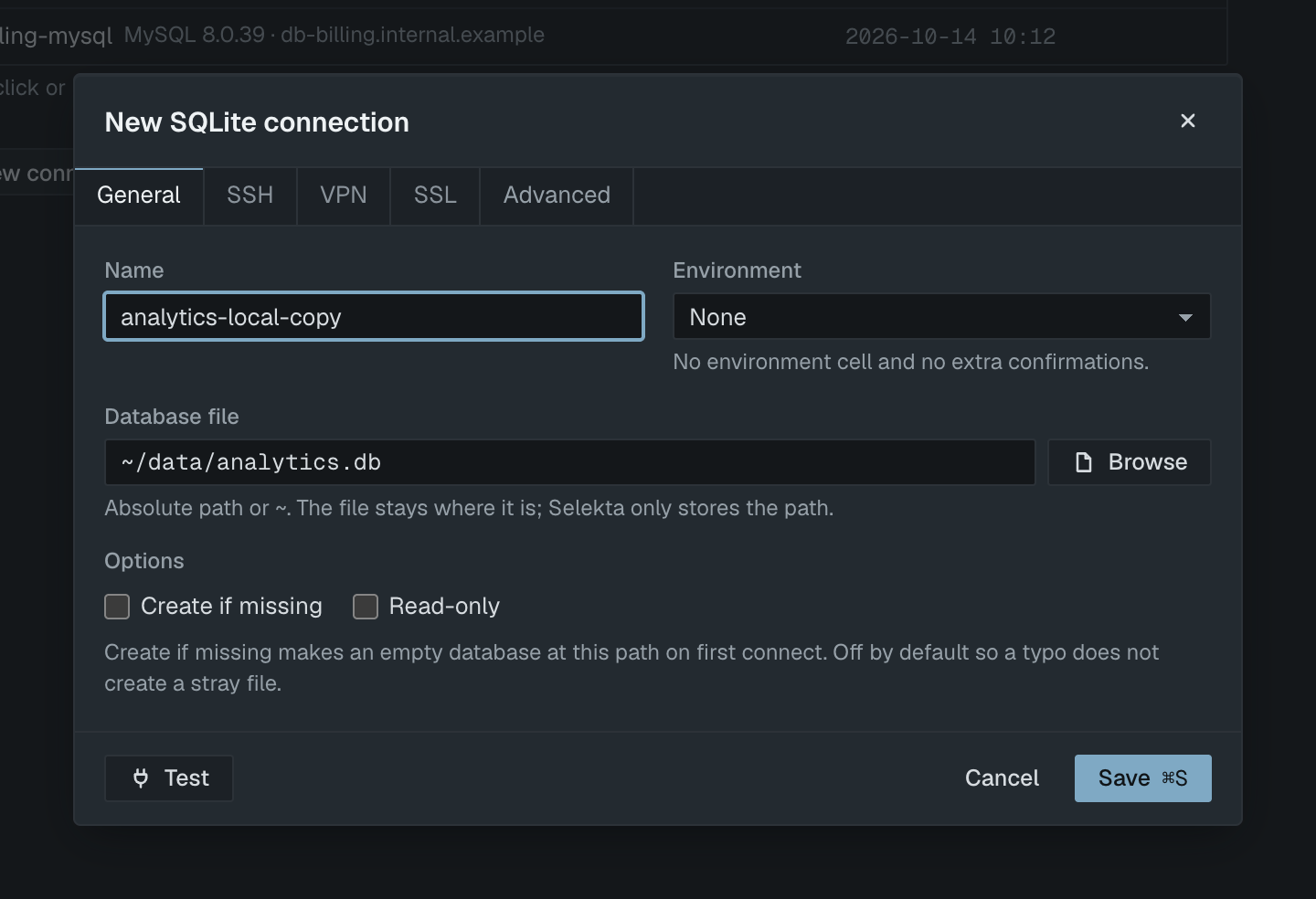
You can also choose SQLite in the engine list and click Browse, type a path, or paste a sqlite:// URL:
sqlite:///Users/me/data/analytics.db
sqlite:analytics.db
Database file takes an absolute path or one starting with ~. The file stays where it is; Selekta only stores the path. If you leave Name empty, the file name without its extension is used, so analytics.db becomes analytics. Paste URLs into the URL field, not into Database file.
A successful test shows the SQLite version, the path and how many tables the file has.
Create a new database
Tick Create if missing under Options. On the first connect, Selekta creates an empty database at that path. The option is off by default so a typo in the path does not leave a stray file behind; with it off, a missing file fails with "File not found at" and the path.
Test never creates the file. With Create if missing on and no file yet, the test reports on an empty in-memory database instead, and the file appears when you connect.
Read-only
Tick Read-only to open the file read-only. Selekta also sets PRAGMA query_only = ON and blocks writing statements before they run, so neither the grid nor a script can change the file. A read-only connection never creates a missing file, even with Create if missing ticked.
Navigator, Explain and scripts
The navigator shows one database, main, with tables and views folders. SQLite's own sqlite_ tables are hidden. Tables with up to 10,000 rows show an exact row count; larger tables show none.
Explain (⌘E) runs EXPLAIN QUERY PLAN and draws the result as a tree. Explain Analyze runs the same EXPLAIN QUERY PLAN, because SQLite has no analyze variant. See Explain plans.
The script splitter keeps a CREATE TRIGGER … BEGIN … END body together as one statement:
CREATE TRIGGER touch_orders AFTER UPDATE ON orders
BEGIN
  UPDATE orders SET updated_at = CURRENT_TIMESTAMP WHERE id = NEW.id;
END;
Backup and limits
Backup… writes a copy of the database with VACUUM INTO, so no external tool is needed. Selekta refuses a backup path that would overwrite the database file itself or its -wal, -shm or -journal files. See Backup and restore.
What SQLite connections do not have:
- SSH, VPN and SSL tabs: the file is local, so these tabs are disabled.
- A password: SQLite files have no login.
- Session time zone: the option exists for PostgreSQL and MySQL only.