
Redis
Selekta connects to Redis with a built-in driver, using a password or an ACL user, plain TCP or TLS, and the database index you choose. The Keys tab browses keys with SCAN and shows each key's type, TTL, size and contents. The Console tab runs commands and prints the answers the way redis-cli does.
Selekta is tested against Redis 7.4. Servers that speak the same protocol, such as Valkey, are shown with their own name and version.
Connect
- Press ⌘N and choose Redis.
- Fill in Host and Port (6379).
- Database index: the database to open first, usually
0. You can switch to any other index later. - User: leave it empty when the server has only a password (
requirepass). Enter the user name when the server uses ACL users. - Enter the Password, then click Test and Save.
The test reports the server version, the user you signed in as and how many keys the database holds.
You can also paste a URL:
redis://:[email protected]:6379/0
rediss://app:[email protected]:6380/2
redis:// is plain TCP and rediss:// is TLS. The number at the end is the database index. The password goes to the macOS Keychain and is never stored in the URL.
Encryption
On the SSL tab:
| Mode | What it does |
|---|---|
| Off | Plain TCP, how most Redis servers listen. The default, because Redis cannot fall back between TLS and plain text. |
| Encrypt, skip verification | TLS without checking the certificate. Use it only for self-signed test servers. |
| Encrypt and verify | TLS with the certificate checked against the system trust store, or the CA certificate you choose, and the host name. |
A client certificate and key for mutual TLS go in the same tab. If the server's certificate is not trusted, the test shows its details and offers to trust that one certificate, as for the other databases. A trusted certificate also works through an SSH tunnel or the VPN.
Navigator
Under a Redis connection the navigator lists the databases, db0 to db15 (or as many as the server's databases setting allows), with their key counts. Double-click a database to open it in the Keys tab. Right-click it for Open keys and Open console.
Keys tab
Connecting opens the Keys tab for the connection's database. Pick another database in the menu at the top left.
- Pattern: type a
MATCHpattern and press ↵.*matches any text,?one character,[ab]either letter. Esc goes back to*. - Tree: keys are grouped by
:, sosession:7f3aandsession:b81esit in asessionfolder that shows its count. A folder with a single key shows the key directly. Each key has a type badge (str,hash,list,set,zset,strm) and its TTL when it expires. - Loading: Selekta scans in steps of about 2,000 keys, so a large database never freezes the app. Load more keys continues the scan.
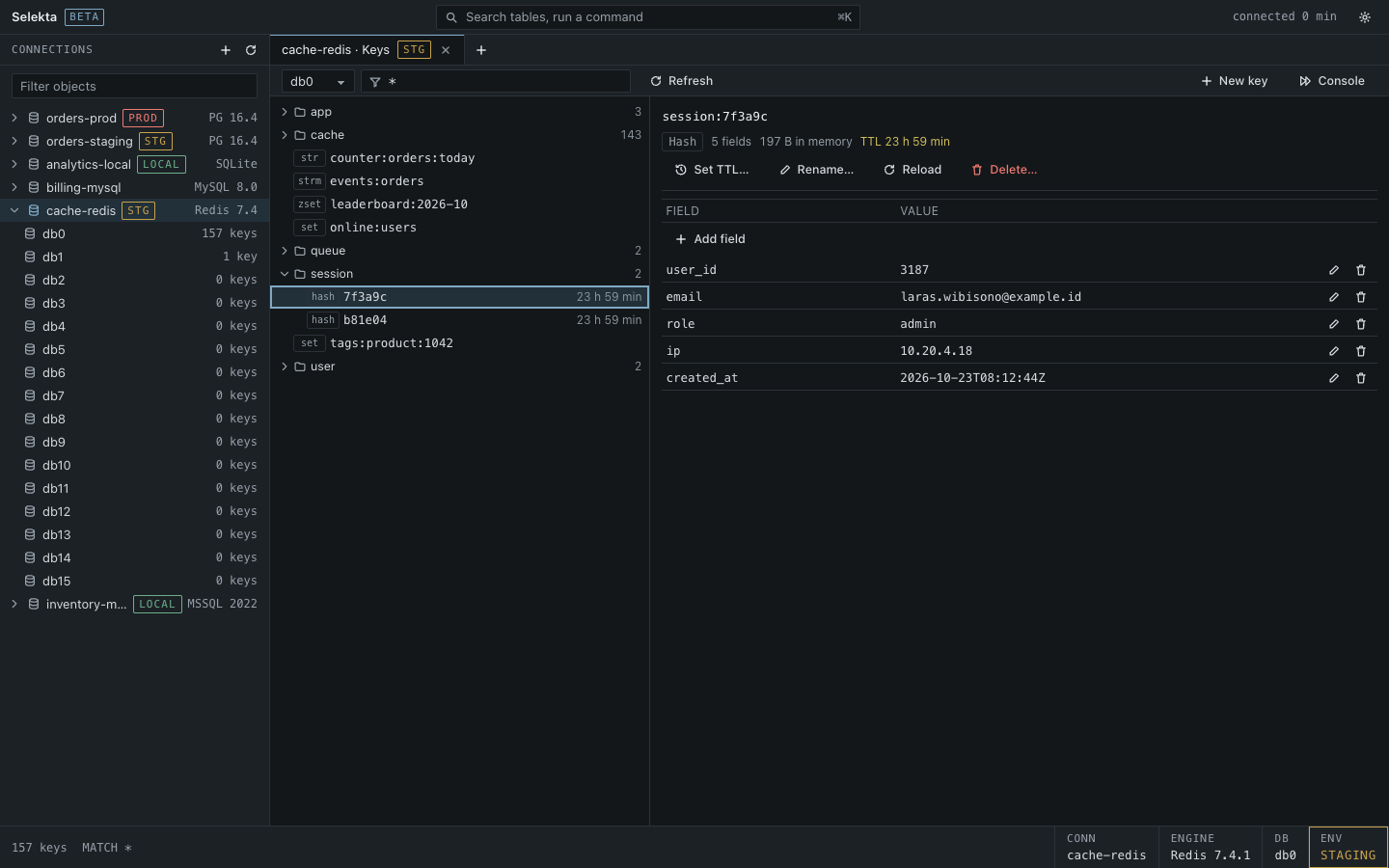
Choose a key to see its type, length, memory use and TTL, and its contents:
| Type | Shown as | Edit here |
|---|---|---|
| String | The text, with Format JSON for JSON values | Edit and Save. The TTL is kept. |
| Hash | Field and value rows | Add field, edit or delete a field |
| List | Index and value | In the console (RPUSH, LSET, …) |
| Set | Members | In the console (SADD, SREM) |
| Sorted set | Member and score, lowest score first | In the console (ZADD, ZREM) |
| Stream | Entry ID and fields | In the console (XADD) |
Collections load 200 entries at a time, with Load more for the rest. Strings over 1 MB show the first 1 MB, with editing off. Binary values show as hex.
For every type you can Set TTL… (seconds, or none to remove the expiry), Rename… (refused if a key with the new name exists) and Delete…. New key creates an empty string to fill in.
Console
Open it with Console in the Keys tab, the connection's menu, or ⌘] on a Redis tab.
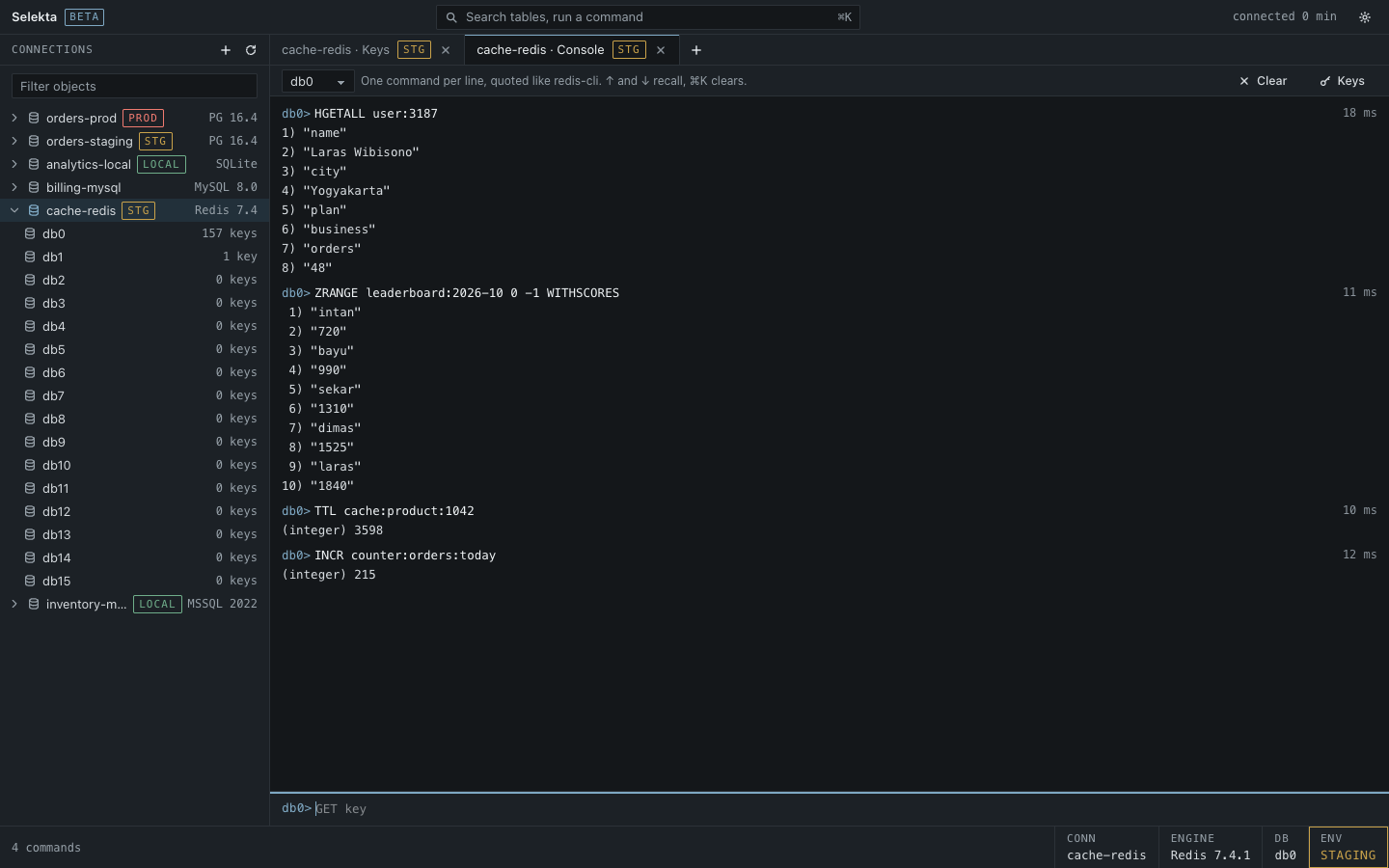
- Type one command per line and press ↵. Quote arguments with spaces as in
redis-cli:SET "my key" "a value". Inside double quotes,\n,\t,\"and\xHHwork. - Answers print like
redis-cli:(nil),(integer) 42,"text", numbered lists and(error) …in red, each with its time. - ↑ and ↓ recall earlier commands, and ⌘K or
clearempties the output. - The database menu above the console picks the database.
SELECTis refused for that reason, as areSUBSCRIBE,MONITORand blocking commands such asBLPOP, because they would hold the connection.
Every console line is saved in Query history. The arguments of CONFIG SET requirepass, ACL SETUSER with a password and MIGRATE … AUTH are hidden there.
Safety
FLUSHDBandFLUSHALLalways ask first. On a Production connection you type the connection name, as forDROPin SQL.- On Production,
DELandUNLINKin the console, and Delete… in the Keys tab, also ask for the connection name. - A read-only connection refuses every write before it is sent: Selekta asks the server which commands write (
COMMAND INFO) and blocks them, along with scripts and transactions. Refused lines are kept in history as VOID. The Keys tab hides its edit buttons.
Not supported yet
- Redis Cluster and Sentinel. Connect to a single node.
- Pub/Sub.
SUBSCRIBEandPSUBSCRIBEare not available in the console. - Editing lists, sets, sorted sets and streams in the Keys tab. Use the console.
- Binary key names. Keys whose names are not UTF-8 show replacement characters and cannot be opened.
- Export and backup of Redis data.