
Structure editor
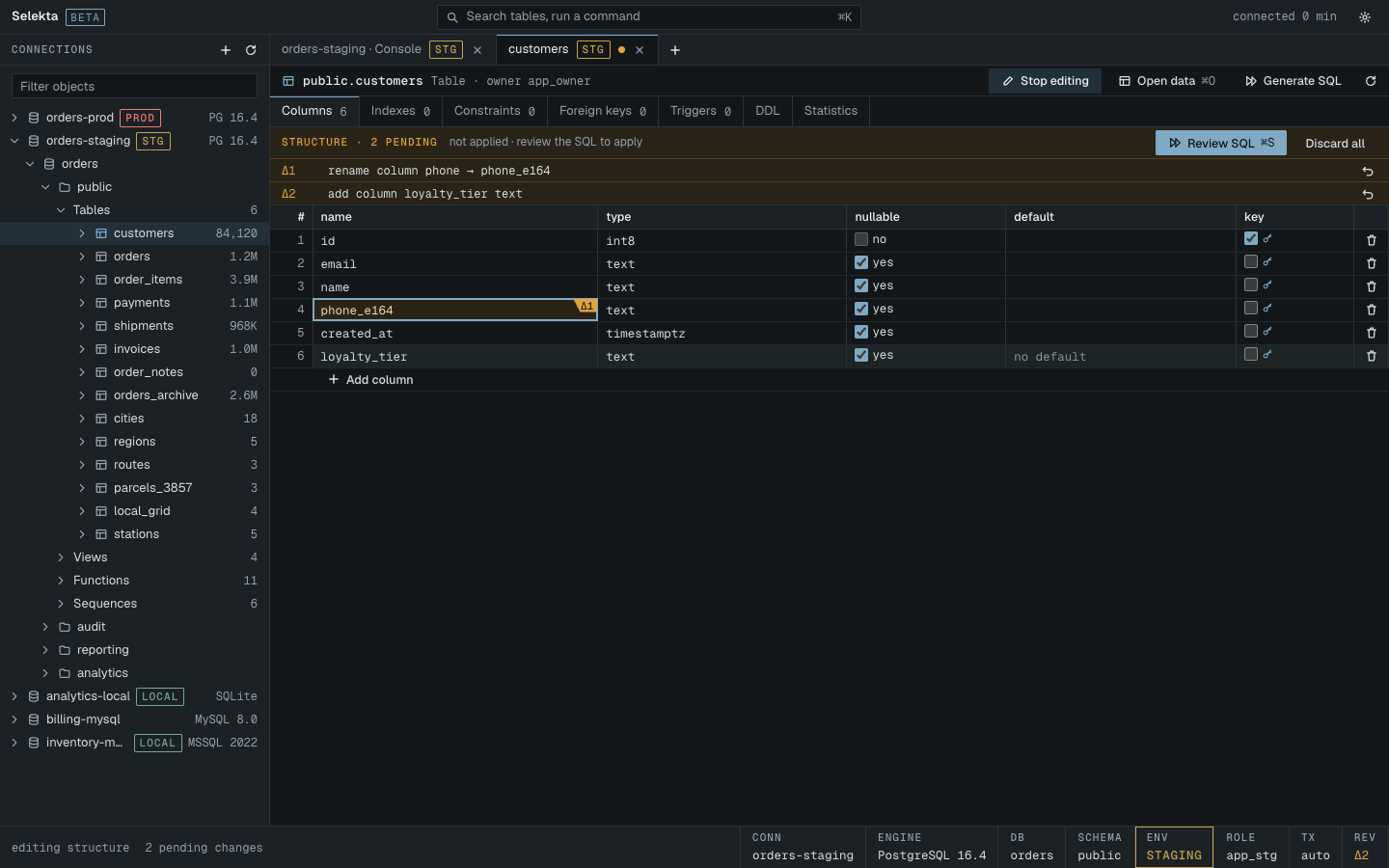
The structure editor turns a table's columns, indexes and foreign keys into an editable draft. Your changes collect as pending revisions, and Review SQL shows the exact DDL for your engine before anything is sent.
Start editing
- Open a table from the navigator. On its Data tab, click Structure, or open the table's object tab directly.
- Click Edit structure. The Columns, Indexes and Foreign keys inner tabs become editable. Use ⌘1 to ⌘7 to switch inner tabs.
- To create a table, right-click a schema or its Tables folder in the navigator and choose New table…. The draft starts with an
idprimary key column in your engine's type (for examplebiginton PostgreSQL,INTEGERon SQLite). Type the table name at the top.
Edit structure is disabled on read-only connections and for objects that are not tables. Click Stop editing to leave; if changes are pending, Selekta asks before discarding them.
Edit columns, indexes and foreign keys
Double-click a cell, or focus it and press Return, to edit it. Return keeps the value and Esc cancels.
Columns
Each column has name, type, nullable, default and key.
- The type field suggests common types for your engine, such as
numeric(14,2),timestamptzandjsonbon PostgreSQL ornvarchar(255)on SQL Server. You can type any type the server accepts. - The default is raw SQL, for example
now()or'pending'. - Ticking key puts the column in the primary key and makes it NOT NULL.
- Add column adds a row at the end. The trash button drops a column; the undo button restores it.
Indexes
Existing indexes are shown as they are; you can drop them. Add index creates a new one with a name, a comma separated column list and unique. The primary key index follows the key column on the Columns tab.
Foreign keys
Add foreign key takes a name, the columns, the referenced table, the referenced columns (as many as the columns) and an on delete action: NO ACTION, RESTRICT, CASCADE, SET NULL or SET DEFAULT. Existing foreign keys can be dropped.
Pending changes
Every difference between your draft and the table on the server is a pending change. Changed cells are clouded with a Δ tag, added rows are marked new and dropped rows are struck through. The strip above the grid reads, for example, Structure · 3 pending and lists each change in words:
rename column note → notes
alter total: type numeric(14,2), not null
add index orders_status_idx (status)- Each change has an undo button that puts that part back as the server has it.
- Changes that cancel out, such as renaming a column back, leave nothing pending.
- Discard all drops every change; nothing was sent to the server.
- Review SQL stays disabled while the draft has a problem, and the strip says what it is: a column without a name or type, two columns with the same name, or a new index or foreign key that is incomplete.
Changes run in a fixed order: table rename, dropped foreign keys, dropped indexes, dropped columns, column renames, column changes, new columns, the primary key, then new indexes and foreign keys, so a new index can use a new column.
Review SQL and apply
Press Review SQL or ⌘S. The dialog is titled Apply 3 changes to orders? (or Create table invoices?) and shows the target connection with its environment tag, then every statement the server will run, numbered, as generated for your engine. It may show warnings, for example when a type change may fail on existing values or lose data.
- Read the statements and warnings.
- Press Copy SQL if you want to keep or run them yourself.
- Press Apply or ⌘↵.
The note at the bottom says whether the plan runs in one transaction. If it does and a statement fails, all of them are rolled back and your changes stay pending. If it does not, the statements before the failure stay applied; click Refresh to see the current structure.
In manual commit, a transactional plan stays pending in the tab's open transaction until you commit it.
Engine differences
- PostgreSQL and SQL Server: the whole plan runs in one transaction, or in a savepoint inside a transaction that is already open.
- MySQL: each
ALTERcommits on its own, so a failure midway leaves the earlier steps applied. The review dialog warns about this. Column changes are written asMODIFYwith the full column definition. - SQLite: adding, renaming and dropping columns, renaming the table, and adding or dropping indexes run in place. Changing a column, the primary key or a foreign key cannot be done in place, so the table is rebuilt: a new table is created, the rows are copied, the old table is dropped and the new one renamed, then indexes and triggers are recreated. This runs in one transaction with foreign keys off and checks them before committing. The rebuilt table does not keep CHECK constraints, collations, generated columns, WITHOUT ROWID or STRICT; the dialog names any it finds.