
PostgreSQL
Selekta connects to PostgreSQL with a bundled native driver on port 5432 by default, using password authentication over TLS when the server offers it. Each connection opens one database, shows its schemas in the navigator, and supports Explain, Explain Analyze and PostGIS geometry on a map.
Connect
Choose PostgreSQL in the engine list, or paste a postgres:// or postgresql:// URL. Fill in Host, Port (5432), Database and User, then Password.
postgresql://[email protected]:5432/orders?sslmode=verify-full- Authentication: user and password, as the server's
pg_hba.confallows (SCRAM and MD5 passwords both work). For certificate authentication, add a Client certificate and Client key on the SSL tab. - SSL: all five libpq modes, from
disabletoverify-full. Remote hosts default torequire,localhosttoprefer. See SSH tunnels and TLS. - Password storage: the password comes from the macOS Keychain or the dialog. Selekta does not read
~/.pgpass. - Application name: sessions identify themselves as
Selektainpg_stat_activity.
When the server rejects the password, the error hint mentions pg_hba.conf: a correct password can still be refused if the server does not allow that user from your address.
Navigator
A PostgreSQL connection shows the one database named in Database. To browse another database on the same server, create a second connection (Duplicate is the quick way).
Under the database you see its schemas, without pg_catalog, information_schema and the toast and temp schemas. Each schema has four folders:
| Folder | Contains |
|---|---|
| tables | Tables and partitioned tables. Partitions themselves are not listed separately. |
| views | Views and materialized views. |
| functions | Functions and procedures. |
| sequences | Sequences. |
Tables and views open on columns, indexes, foreign keys and triggers. The schema diagram works per schema, starting from public.
Session settings
Session time zone on the Advanced tab decides the zone for now(), timestamps without a zone, and how timestamptz values are shown.
- Server default follows the server's own setting, including
ALTER DATABASE … SET timezoneandALTER ROLE … SET timezone. - This Mac's zone uses the zone your Mac is set to.
- UTC uses UTC.
Every session of the connection, including each SQL editor tab, gets the same zone.
Connection pooler
Turn on Connection pooler when you connect through PgBouncer or another transaction pooler. Selekta then stops sending startup options that poolers refuse, and Cancel closes the connection instead of cancelling by backend process id (the id belongs to whichever server connection the pooler picked). Without a pooler, Cancel uses pg_cancel_backend.
Read-only
A read-only PostgreSQL connection starts with default_transaction_read_only on and sets each session to SET SESSION CHARACTERISTICS AS TRANSACTION READ ONLY before every transaction. Statements that write, or that try to switch read-only off again, are blocked before they reach the server. See Connections.
Explain and transactions
Explain (⌘E) runs EXPLAIN (FORMAT JSON) and draws the plan as a tree. Explain Analyze (⌥⌘E) runs EXPLAIN (ANALYZE, BUFFERS, FORMAT JSON), which executes the statement, so the usual confirmations for destructive statements still apply. Details are in Explain plans.
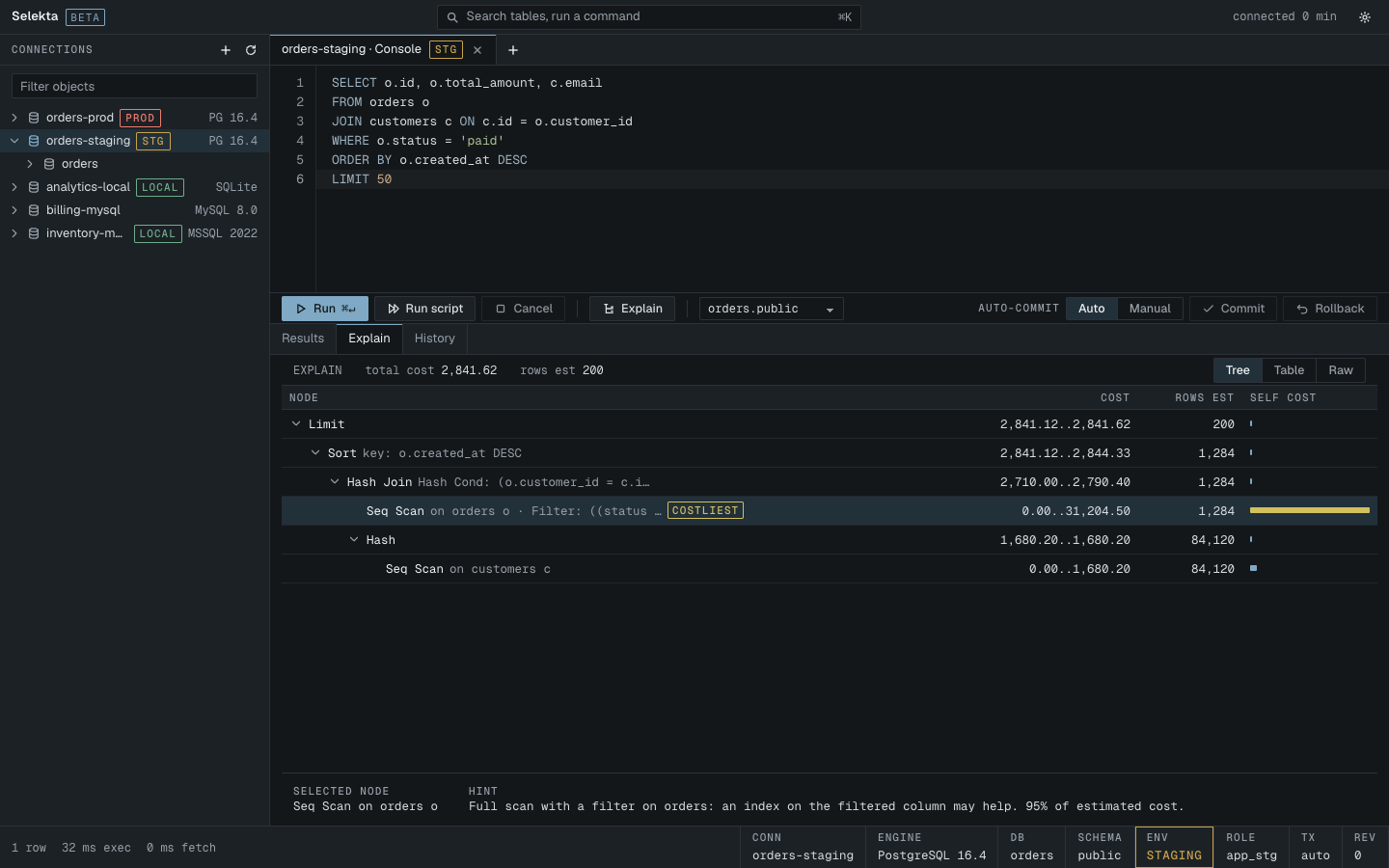
On Production and Staging connections, a DELETE or UPDATE with a WHERE clause first gets a row estimate from the planner. Above about 1,000 rows it needs confirmation, and the message shows the estimate. See Production safety.
In manual commit mode, a failed statement leaves the PostgreSQL transaction aborted. Selekta tells you to roll back before you continue, as the server requires.
The script splitter knows dollar-quoted bodies ($$ … $$) and BEGIN ATOMIC … END function bodies, so a CREATE FUNCTION runs as one statement.
PostGIS and data types
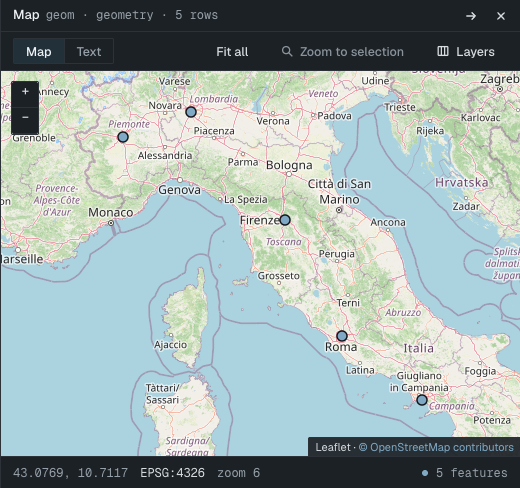
Columns of type geometry and geography are decoded from PostGIS and can be shown on the map panel; geography values without an SRID are treated as SRID 4326. See Maps.
json and jsonb values open as JSON. Enums, domains and other user-defined types show their type names in the grid.
Backup and limits
Backup… and Restore… use pg_dump and pg_restore from your Mac, for example from Homebrew. They are not bundled. Plain SQL files restore through Selekta's own splitter in one transaction, because psql is not bundled either; psql backslash commands in such a file are skipped and logged. See Backup and restore.
Not supported today:
- Browsing several databases from one connection.
- Kerberos (GSSAPI) and other non-password login methods.
- Reading passwords from
~/.pgpass.